
Download KBPiano – piano, keyboard, music, virtual piano, play piano, learn piano, MIDI, music production, compose music, music tool, music app, free piano app, digital piano, music software, virtual keyboard, music education, piano learning, music composition, music creation, music maker
Overview
KBPiano is a digital music tool designed to transform a standard computer keyboard into a fully functional virtual piano, enabling users to learn, play, and create music without the need for a physical instrument. This application serves as a practical solution for individuals exploring music education, aspiring composers, and hobbyists seeking an accessible way to engage with music production. By leveraging the computer’s keyboard as a MIDI input device, KBPiano removes the barrier of entry typically associated with traditional instruments or expensive hardware. Its core purpose lies in democratizing music creation, making it possible for users across various skill levels to experiment with melodies, harmonies, and compositions. The app is particularly valuable in educational settings, home practice environments, and creative studios where space or budget constraints limit access to physical pianos. Although the developer did not provide additional technical details, KBPiano has maintained relevance since its initial release in 2014, suggesting consistent usability and reliability. The application fits within the broader productivity and music software ecosystem by offering a lightweight yet capable platform for early-stage music experimentation and skill development.Key Features & Functionality
KBPiano delivers a suite of tools tailored for music creation and learning, centered around keyboard-based piano simulation. The application features a comprehensive sound library with 128 distinct instrument voices, including piano, guitar, violin, and other orchestral tones, allowing users to explore diverse sonic textures and styles. This diversity supports both musical experimentation and composition across genres. Real-time mixing with 15-channel support enables users to layer multiple instrument tracks, facilitating the creation of complex MIDI compositions. This feature is especially beneficial for those interested in music production, as it allows for dynamic control over individual tracks during playback. The user-friendly interface ensures immediate accessibility—beginners can start playing within minutes, while more advanced users can leverage the full range of MIDI capabilities. High-quality recording functionality allows users to capture performances and compositions, which can be saved for review, sharing, or further editing. These recordings are optimized for clarity when used with a capable sound card, making KBPiano suitable for both casual practice and more serious music projects. The MIDI composition tools support the creation and manipulation of digital music, empowering educators, students, and independent artists to explore music theory and arrangement in a flexible, intuitive environment.- Comprehensive sound library with 128 instrument voices including piano, guitar, violin, and more
- Real-time 15-channel mixing for layered music production
- Intuitive interface suitable for beginners and experienced users
- High-quality recording of performances and compositions
- MIDI composition tools for digital music creation and editing
Interface, UX & Performance
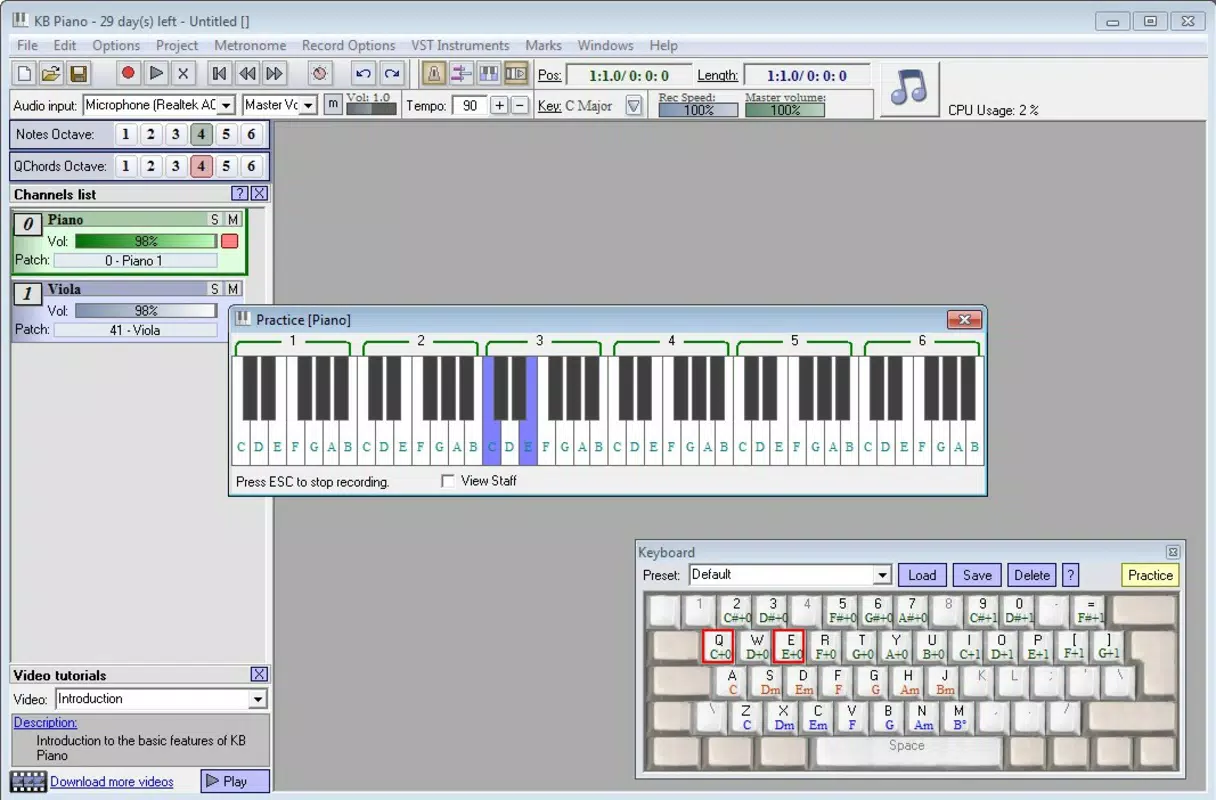
The user interface of KBPiano is designed with simplicity and functionality in mind, prioritizing ease of access over visual complexity. The layout clearly maps the computer keyboard to piano keys, with visual feedback that helps users identify which notes are being played. Navigation is straightforward, relying on standard keyboard inputs and minimal on-screen controls, which reduces cognitive load and enhances usability. The application responds promptly to key presses, ensuring minimal latency between input and sound output—a critical factor for real-time music performance and practice. Although the developer did not list formal performance metrics, the app’s lightweight file size of 32.4 MB suggests efficient resource usage, which likely contributes to smooth operation across a range of Windows devices. Performance is expected to remain stable on modern systems, though compatibility with older hardware may vary without explicit confirmation. Responsiveness is consistent during playback and recording, supporting uninterrupted creative flow. Stability appears to be a strength, given the app’s long-standing presence since 2014. The lack of reported issues in public forums suggests reliable operation under typical usage conditions. Users can expect a consistent experience whether practicing scales, composing short pieces, or experimenting with layered sound effects.Platform Compatibility & Technical Requirements
KBPiano is available exclusively for the Windows platform, making it accessible to users of desktop and laptop computers running compatible Windows operating systems. The current software version is 1.2.3, and the application has a file size of 32.4 MB, indicating a lightweight footprint that minimizes storage demands. While the developer did not specify minimum OS requirements, the app’s release date in 2014 suggests it may function on Windows 7 and later versions. However, compatibility with newer Windows releases, such as Windows 11, cannot be confirmed without additional details. The application does not require advanced hardware or dedicated audio interfaces, but optimal performance is recommended when paired with a quality sound card. Specific system requirements, including processor speed, RAM, or graphics capabilities, were not listed. Users are advised to ensure their system meets general Windows application standards. For those seeking a free, desktop-based music tool, KBPiano presents a viable option—especially for users with older or modest hardware who still want access to digital piano functionality.Pros and Cons
- Free to download and use, making it accessible to all users
- Converts standard computer keyboard into a functional virtual piano
- Extensive sound library with 128 instrument voices
- Supports real-time mixing and MIDI composition
- Lightweight design with minimal system resource usage
- Intuitive interface suitable for beginners and educators
- Only available for Windows, limiting cross-platform use
- No official updates since 2014, raising concerns about long-term compatibility
- Specific system requirements not disclosed
- May not support newer Windows features or audio drivers
- Limited documentation or user support resources


